
Forex Top Team Trading Toolkit
11 MT4/MT5 tools for discretionary traders
Five complete trading methods, each with an on-chart Navigator indicator and a semi-automatic Assist EA, plus the CurrencyPower Meter. Provided at no charge when you trade through a qualifying HFM or RoboForex account opened with our partner link.
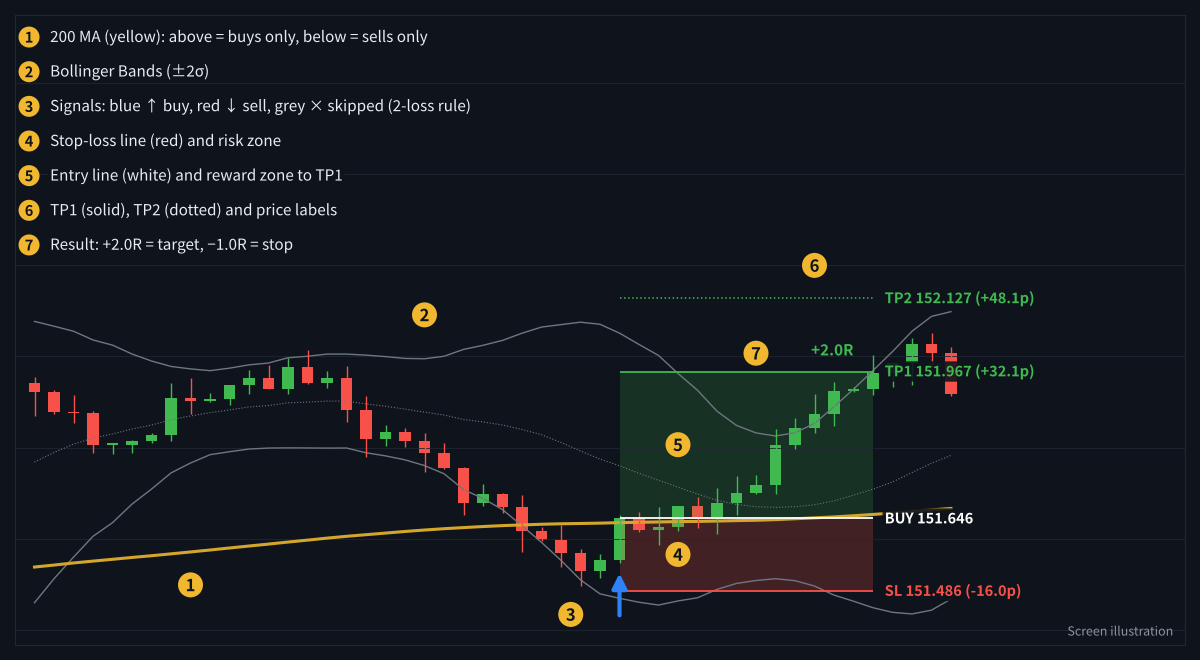
Example: SimpleRange Navigator on a chart (illustration with simulated prices)
How it works
Open an account
Open a live account with HFM or RoboForex through our partner link below. The account is in your own name, and your funds stay with the broker.
Send your request
Fill in the form with your broker, account number and platform (MT4 or MT5), and choose the tools you want.
Receive your files
We confirm the account and email you the tools, built to work on your account number only. Setup guides are included.
Step 1: Choose your broker
HFM
- MT4 and MT5
- Cent accounts available: start small while you learn the tools
- Our main broker for live trading and copy strategies
RoboForex
- MT4 and MT5
- Cent accounts available (ProCent)
- A second option if HFM is not available in your country
Broker services are not available in every country (for example, the United States). Check that the broker accepts residents of your country before opening an account.
Step 2: Choose your tools
Every method comes as a pair. The Navigator shows the setup, entry, stop-loss and take-profit levels on your chart. The Assist EA is semi-automatic: you decide when the market conditions are right and press the approve button, and the EA then places and manages orders according to the method’s rules.
SimpleRange
Risk: moderate
Buys pullbacks to the lower Bollinger Band in an uptrend (above the 200 MA) and sells rallies to the upper band in a downtrend, with fixed 1:2 targets.
NavigatorAssist EA
How it works & screenshots →
TrendLogic
Risk: moderate
Follows the trend using Heikin-Ashi, Parabolic SAR, CCI and the higher-timeframe direction, with clear skip rules.
NavigatorAssist EA
How it works & screenshots →
ReversalLogic
Risk: higher
Looks for exhaustion with TD Sequential 9/13, Bollinger Bands and Heikin-Ashi, using a two-position exit plan.
NavigatorAssist EA
How it works & screenshots →
BreakoutLogic
Risk: high
Trades the first range breakout of the London–New York session, and reverses with a larger position if the breakout fails. Position size needs strict control.
NavigatorAssist EA
How it works & screenshots →
HedgeLogic
Risk: high
Combines averaging and hedging to work out of positions. Suitable only for experienced traders with a risk plan.
NavigatorAssist EA
How it works & screenshots →
CurrencyPower Meter
Analysis tool
Ranks 8 major currencies across 28 pairs on three timeframes, so you can pick the strongest and weakest pairs at a glance.
Indicator
How it works & screenshots →
Which tool fits you?
| If you want to… | Start with |
|---|---|
| Learn a simple, rule-based method first | SimpleRange + CurrencyPower Meter |
| Ride clear trends and avoid choppy markets | TrendLogic |
| Catch turning points after strong moves | ReversalLogic |
| Trade the moment a range breaks | BreakoutLogic (experienced traders) |
| Manage positions that went against you | HedgeLogic (experienced traders) |
What you receive
| Your account | Tools provided |
|---|---|
| New account opened with our partner link | CurrencyPower Meter + all 5 Navigator indicators |
| Funded account (minimum deposit: USD 200 or equivalent) | All of the above + all 5 Assist EAs |
Files are compiled (.ex4/.ex5) and locked to your account number. Licences are renewed while the account remains registered under our partner code.
Step 3: Request your tools
Send the form below after opening your account. We usually reply within 2 business days.
Frequently asked questions
Are the tools really free?
There is no charge for the tools. We are an introducing broker (IB) partner of HFM and RoboForex, and we may receive compensation from the broker based on your trading activity. This does not add a fee to your account.
Can I use the tools on another broker or a demo account?
The tools are built for live accounts registered under our partner code at HFM or RoboForex. If you want to use another broker, please contact us first.
Do the Assist EAs trade fully automatically?
No. They are semi-automatic. You decide when conditions are suitable and approve trading with a button. You remain responsible for every trading decision and can stop the EA at any time.
Do I need a VPS?
The Navigator indicators work on any computer. If you want an Assist EA to keep managing positions while your computer is off, a Windows VPS is recommended. The EAs use an English interface, so they display correctly on VPS servers.
MT4 or MT5?
Every tool is available for both MT4 and MT5. Choose the platform of the account you registered.
Compensation disclosure: Forex Top Team receives introducing-broker compensation from HFM and RoboForex based on the trading activity of referred clients. Nothing on this page is financial, investment, legal or tax advice. Client funds are held by the broker in the client’s own account; we never hold client funds.