
HedgeLogic Navigator & Assist
Average into your chosen direction on TD Sequential signals, align the targets so a small bounce closes everything, and hedge step by step if the market keeps going against you — with a 10% loss lock.
What HedgeLogic does
You choose the direction from fundamentals or sentiment. HedgeLogic then times the entries with TD Sequential: it enters on a 9 or 13, adds to the position if price moves against you, and aligns all targets so a modest bounce closes everything in profit. If price keeps going against you, it hedges step by step until the position is fully hedged, which stops the loss from growing.
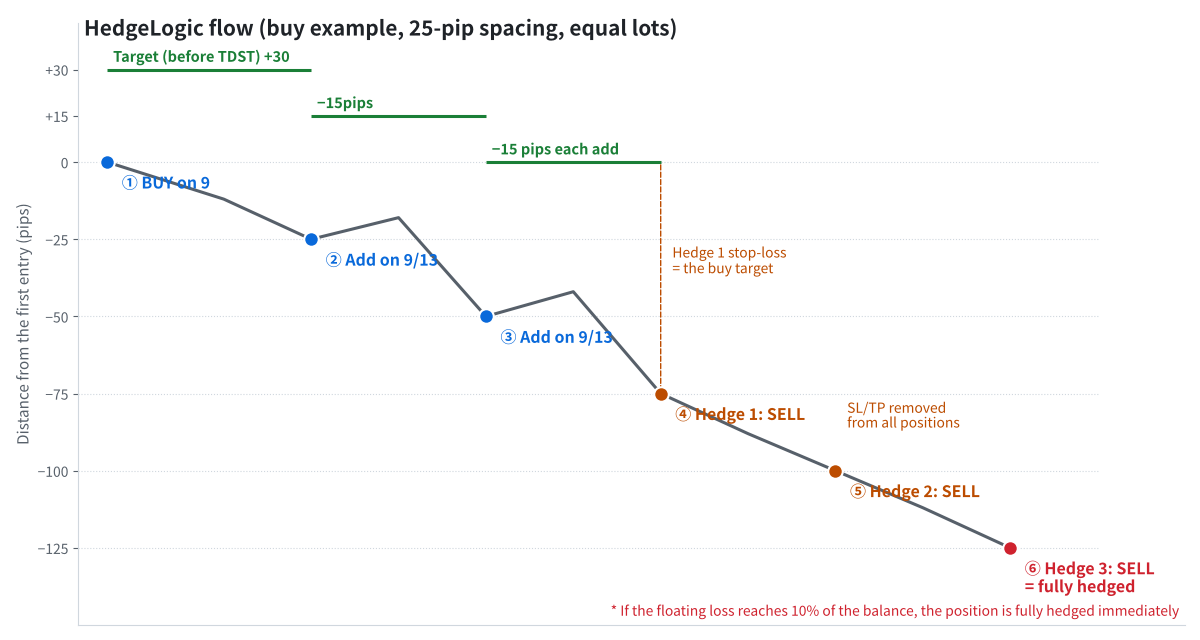
Buy example: 3 averaging entries, then 3 hedges until fully hedged
The two possible outcomes
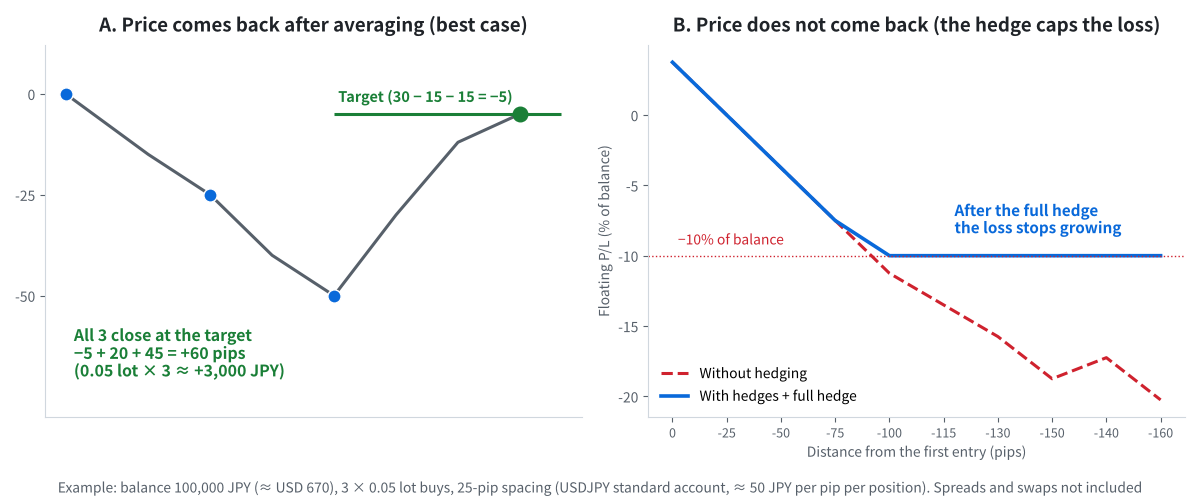
A: price comes back and all positions close at the target. B: the hedge stops the loss at about −10%
Rules (buy campaign; sell is the reverse)
- Direction: you decide (BUY campaign or SELL campaign).
- First entry: on a TD Sequential 9 or 13 in that direction. Target just before TDST.
- Averaging: when price is 25 pips or more against the latest position and a new 9/13 appears, add the same lot (maximum 3 adds). All targets move 15 pips closer and line up.
- Hedging: after the last add, open an opposite position every 25 pips. Hedge 1 uses the main target as its stop-loss. From hedge 2, stop-loss and take-profit are removed from all positions. After hedge 3 the position is fully hedged.
- 10% rule: if the floating loss reaches 10% of the balance at any stage, the remaining exposure is hedged immediately.
- After the full hedge: you manage the exit by removing or adding hedges one at a time. The tools alert you with ReversalLogic signals as guides.
After a full hedge: unwinding
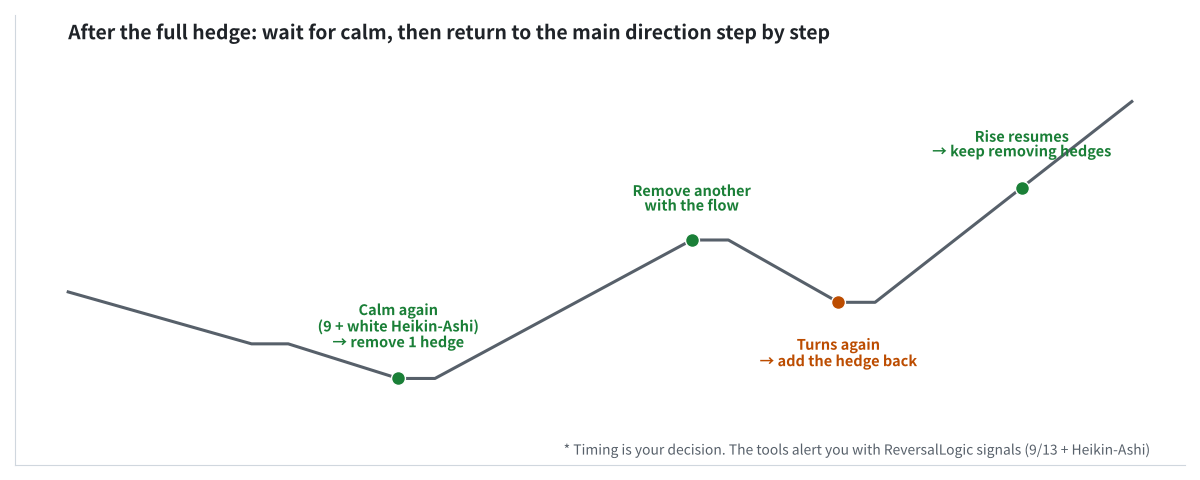
Remove hedges when the market calms down; add them back if it turns again
How to use the Navigator (indicator)
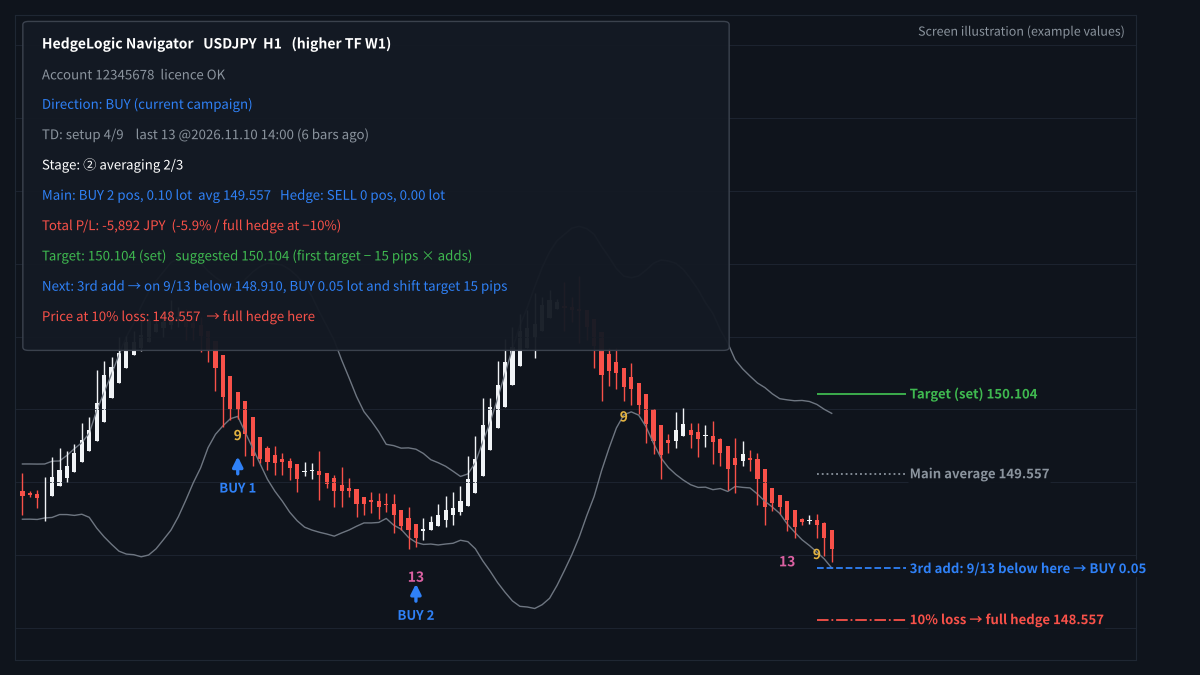
TD 9/13, the campaign stage, the next add/hedge price and the 10% loss price
- Attach HedgeLogic Navigator and set the direction you want to trade.
- Before you enter: it draws the full plan — every add and hedge level, the target, the locked loss after a full hedge and the margin needed.
- During a campaign: the panel shows the stage, lots, average price, floating P/L in %, the next add or hedge price and the price where the loss reaches 10%.
- Alerts tell you when a 9/13 appears, when a hedge level is reached, and when the loss reaches 8% and 10%.
How to use the Assist EA (semi-automatic)
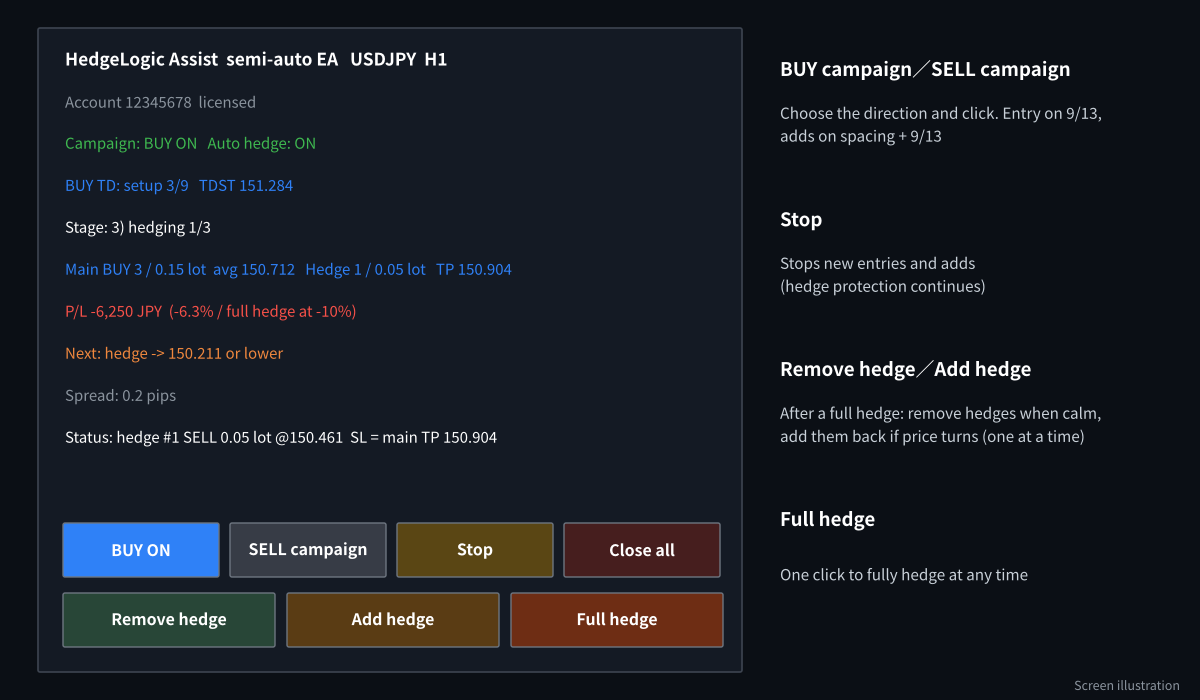
The Assist EA panel and buttons
- Attach HedgeLogic Assist to the same chart and turn on AutoTrading.
- Click BUY campaign or SELL campaign. The EA enters on the next 9/13 and adds and hedges automatically by the rules.
- Stop blocks new entries and adds, but hedging for protection continues.
- After a full hedge, use Remove hedge and Add hedge to unwind step by step. Full hedge locks everything with one click at any time.
Recommended settings
| Item | Default | Notes |
|---|---|---|
| Timeframe | H1 | |
| Spacing | 25 pips | Between adds and between hedges. |
| Averaging | Max 3 adds, same lot | Targets shift 15 pips per add. |
| Hedges | 3 steps | Full hedge after the 3rd. |
| Loss lock | 10% of balance | Full hedge immediately. |
| Guards | Max total lots, margin level ≥ 300% | Hedges are never blocked by the guards. |
| MT5 | Hedging account | The EA does not trade on netting accounts. |
Frequently asked questions
Does a full hedge mean I cannot lose more?
The floating loss stops growing with price, but you still pay spreads and swaps, and the locked loss is real until you unwind it. Unwinding at the wrong time can increase the loss.
Can I use it on any broker?
The account must allow hedging (buy and sell on the same symbol). HFM and RoboForex MT4 accounts and MT5 hedging accounts support this.
Who should use HedgeLogic?
Experienced traders who already use ReversalLogic, understand averaging and hedging, and keep the position size small relative to their balance.
Get HedgeLogic free
Open an HFM or RoboForex account through our partner link, then send the request form. We build the files for your account number.
Compensation disclosure: Forex Top Team receives introducing-broker compensation from HFM and RoboForex based on the trading activity of referred clients. Client funds are held by the broker in the client’s own account; we never hold client funds. Nothing on this page is financial, investment, legal or tax advice.