GoldMaster-EA
What GoldMaster-EA Is
GoldMaster-EA is not a low-volatility EA, a stable income product, or a substitute for conservative long-term investing. It is designed as an aggressive expansion unit inside a wider portfolio.
Portfolio Positioning
Wealthy portfolios are often divided into three layers:
- Defensive assets
- Income-producing assets
- High-return expansion assets
GoldMaster-EA belongs to the third layer.
Main Objective
This EA is not built to protect existing capital.
Its purpose is to push the upper limit of your total assets higher.
Core Philosophy
GoldMaster-EA is based on asymmetry:
explosive upside potential × probability of success − loss on failure
As long as expected value remains positive, the strategy remains valid.
Design Philosophy
How It Works
- Balance-linked lot sizing
- Compounding acceleration
- Rotational structure including averaging elements
- High-speed entry logic designed for aggressive growth
Critical Premise
GoldMaster-EA is a high-risk, high-return system. Theoretical maximum drawdown can reach 100%.
- Failure is possible
- Volatility is high
- This is not a stable monthly income model
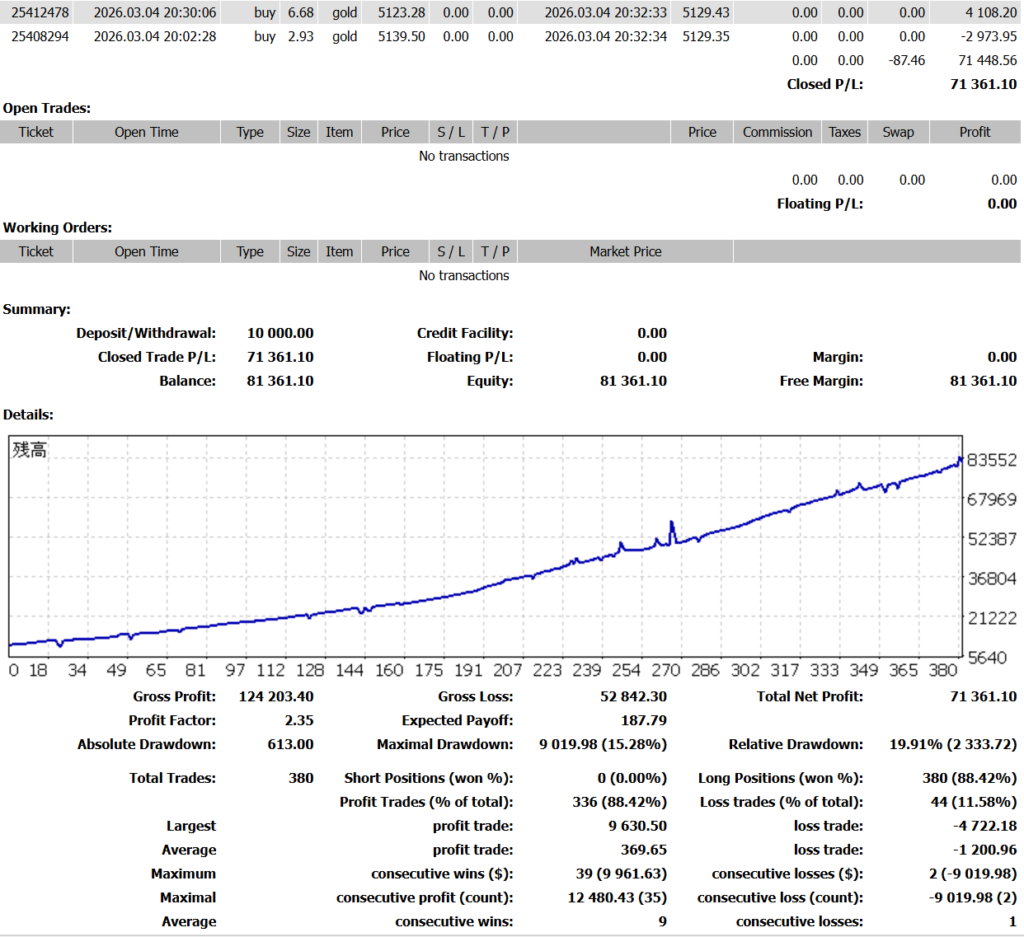
Backtest Highlight 1
In about 1 month
An example of extreme compounding under aggressive settings.
Backtest Highlight 2
In about 2 weeks
Shows the acceleration profile this EA is built for.
Forward Performance Example
A forward result example showed capital growing to 8.1× in one month.
Past results and theoretical models do not guarantee future performance.
Who This Is For
Suitable For
- Traders who already have defensive assets elsewhere
- Those who can allocate surplus capital only
- People who can tolerate sharp short-term volatility
- Investors who make decisions based on math, not emotion
Not Suitable For
- Anyone using living expenses or essential savings
- Those seeking stable or predictable monthly returns
- Anyone with low drawdown tolerance
- Anyone who wants a “safe” or “hands-off” product
The Split Structure: 5 / 6 / 7 Unit Model
GoldMaster-EA should not be operated by putting your entire capital into one run. The recommended method is a split structure.
The Meaning of “Split”
Split does not mean running many accounts at once with all funds deployed simultaneously.
It means preparing separate capital units for sequential use.
↓
If it succeeds, follow your withdrawal rules
↓
If it fails or finishes, move to the next unit
↓
Repeat within your total allocation
More aggressive. Larger capital per unit, fewer total attempts.
Best balance. Balanced between unit size and number of attempts.
More defensive. Smaller capital per unit, more total attempts.
Capital Allocation Examples
| Total Capital | 5 Split | 6 Split | 7 Split |
|---|---|---|---|
| $1,000 | $200 × 5 | $170 × 6 | $140 × 7 |
| $3,000 | $600 × 5 | $500 × 6 | $430 × 7 |
| $5,000 | $1,000 × 5 | $830 × 6 | $710 × 7 |
| $10,000 | $2,000 × 5 | $1,700 × 6 | $1,400 × 7 |
| $20,000 | $4,000 × 5 | $3,300 × 6 | $2,800 × 7 |
Why This Structure Matters
This is close to an option-style capital design. One failed unit does not destroy the whole portfolio, while one explosive unit can have a major expansion effect.
Common Mistake
Do not deploy all split units simultaneously as one lump-sum strategy unless that is your deliberate advanced plan. The standard concept here is controlled unit-based operation.
Withdrawal Strategy: The EA Is Incomplete Without It
GoldMaster-EA is designed to be operated together with withdrawal rules. The point is not only to grow the balance, but to convert growth into protected realized value.
Model A: Principal Recovery + Milestone Cash-Out
Recommended for balance between protection and upside.
- At 2×: withdraw 100% of initial principal
- At 3×: withdraw 1/3
- At 5×: withdraw 1/2
- At 10×: withdraw 70%
Example with initial $1,000
- 2× = $2,000 → withdraw $1,000 → account remains $1,000
- 3× = $3,000 → withdraw $1,000 → account remains $2,000
- 5× = $5,000 → withdraw $2,500 → account remains $2,500
- 10× = $10,000 → withdraw $7,000 → account remains $3,000
Best for: traders who want to recover capital early while still allowing explosive upside.
Model B: 3× Then Withdraw 33%
Recommended for faster compounding acceleration.
- Whenever the account reaches 3×, withdraw 33%
- Continue operating with the remaining 67%
Example with initial $1,000
- 1st cycle: $3,000 → withdraw $1,000 → continue with $2,000
- 2nd cycle: $6,000 → withdraw $2,000 → continue with $4,000
- 3rd cycle: $12,000 → withdraw $4,000 → continue with $8,000
Best for: traders who want to cash out while still keeping the account on a doubling path.
Simple Weekly Check Method
If you do not want to monitor every day, choose one fixed day each week
(for example, Sunday night), check the balance, and only act if your withdrawal condition has been met.
Key Principle
Withdraw by rule, not by emotion. The system is aggressive, but the cash-out structure should be mechanical.
Restart Rules After a Unit Failure
If one unit goes to zero, you do not need to reset the entire structure. Rebuild only the failed unit.
Basic Restart
Rebuild the failed unit using unused capital only.
This is the safest and most recommended approach.
Acceleration Restart
When the market is stable, you may use up to 20% of the profit pool to accelerate the restart.
The remaining 80% should stay protected.
Important
Using up to 20% of profits is optional, not mandatory. If conditions are unstable, do not force a restart with profits.
Good Times to Use Partial Profit for Restart
- Clear trend conditions
- Stable market environment
- Strong momentum and clean continuation phases
Bad Times to Use Profits for Restart
- Immediately after a drawdown
- Chaotic or headline-driven volatility
- No clear direction
Do Not Do This
- Do not reinvest all profits
- Do not increase size emotionally
- Do not restart immediately after collapse without evaluating conditions
The Structural Idea
Protect 80%. Accelerate with 20% only when conditions justify it. That is how long-term survival and upside can coexist.
Drawdown Pause Rule
Mandatory Cooling-Off Period
After a drawdown event, pause operation for at least one full week.
- Allow market conditions to reset
- Avoid consecutive losses in unstable structure
- Return to neutral decision-making instead of emotional reaction
After any withdrawal, drawdown, VPS restart, or balance change, always recheck the account balance and reset the initial lot size properly.
Manual Control: TRADING OFF Button
GoldMaster-EA includes a TRADING OFF function on the chart.
- If you click BUY or SELL, the button color changes from yellow to gray
- When grayed out, positions in that direction will not be opened
- This can be used to temporarily block one side of trading when needed
Manual ON/OFF Is Optional
Discretion is not required for this EA to function. It is an optional layer for experienced users who can identify unusual market conditions.
When Manual Control May Help
- Major economic announcements
- Sharp geopolitical headlines
- Obvious trend breakdowns
- Highly distorted price action
When Not to Use It
- Out of fear
- Randomly or too frequently
- Without a clear rule
- As emotional interference
Main Message
GoldMaster-EA is a strategy EA, not a discretionary EA. The rules are the core. Manual control is only a secondary option.
Setup Essentials Before Running the EA
Six Critical Checkpoints
- Use the M15 timeframe only
- Adjust the initial lot size according to your account capital
- On XM micro accounts, use GOLDmicro, not regular GOLD
- Add https://fxdatapro.com/ to MT4 WebRequest permissions
- Follow the withdrawal rules strictly
- Follow split and restart rules instead of lump-sum operation
Timeframe
M15 only.
The logic is fixed to the 15-minute chart. Using another timeframe may break intended behavior.
Initial Lot Size
The initial lot is extremely important because the EA is balance-linked.
- Standard account example: $1,000 → 0.05 lot
- Cent account example: $10 → 0.05 lot
Adjust proportionally to your capital and risk profile.
Micro Account Note
If one unit is below about $6,000, a micro account may be more efficient for compounding.
XM Micro Gold Symbol
- Right-click inside Market Watch
- Select Show All
- Find GOLDmicro
- Right-click and open the chart
- Change timeframe to M15
Important: if you attach the EA to regular GOLD instead of GOLDmicro on a micro account, trades may not be executed.
MT4 Installation Guide
Step 1. Transfer the EA Files
- Create or download the EA file and note where it is saved
- Copy the EA file
- Locate your MetaTrader 4 folder, usually on the C drive
- Paste the file into the Experts folder
Step 2. Install the EA on the MT4 Platform
- Launch MT4
- In the Navigator panel, open Expert Advisors
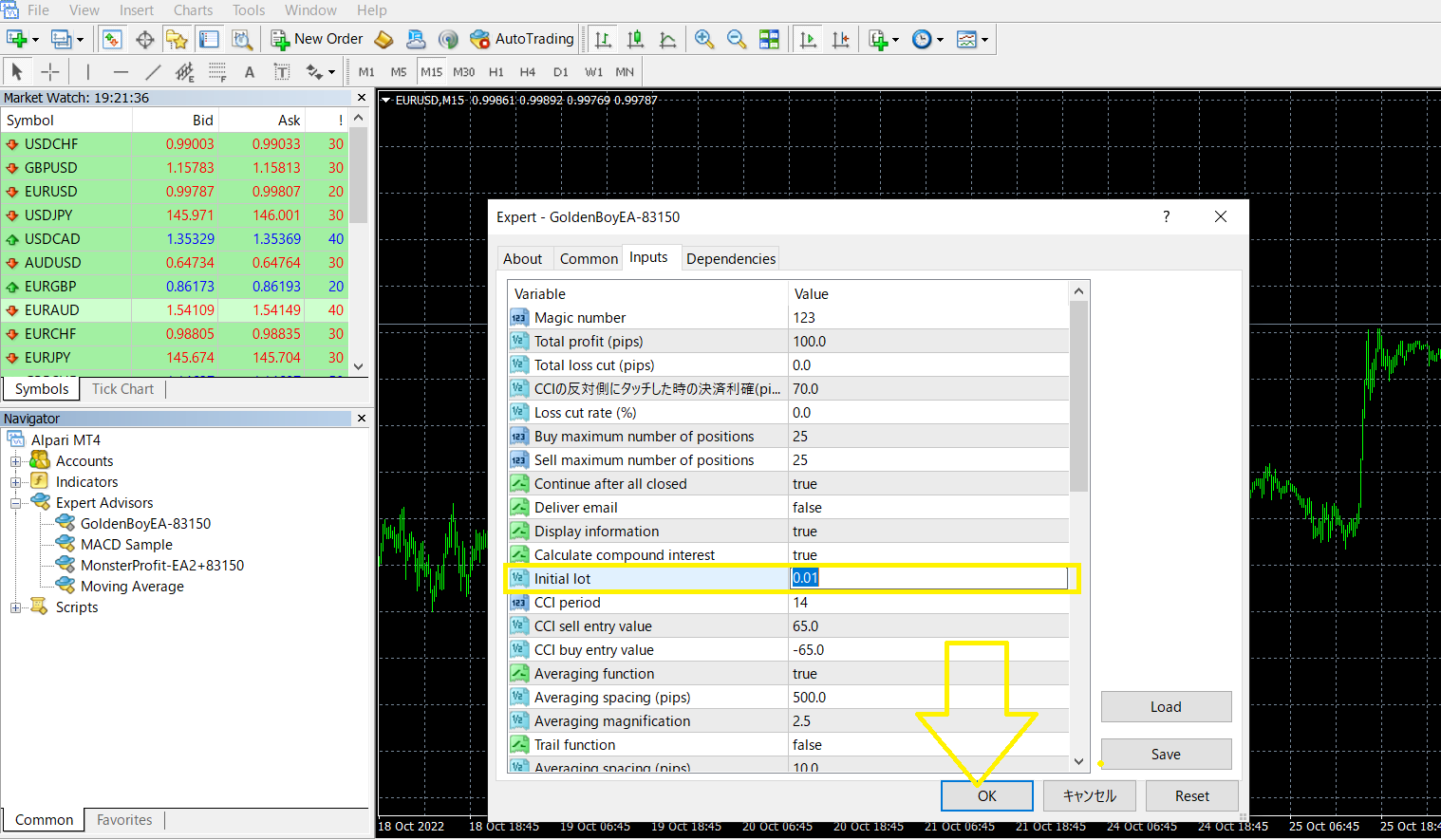
- Drag GoldMaster-EA onto the correct chart
A pop-up window will appear where you can confirm the EA settings. Click OK after checking the configuration.


Step 3. Use the Correct Chart
Use the 15-minute chart only.
Use GOLD (XAUUSD) or GOLDmicro depending on your account type.


Step 4. Allow WebRequest URL
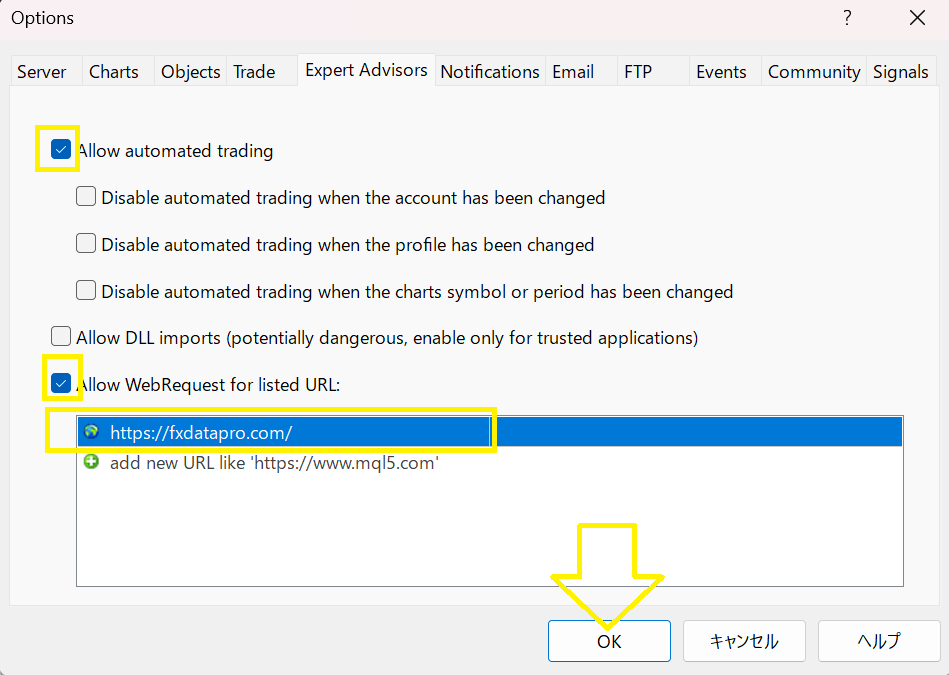
In MT4, go to:
Tools → Options → Expert Advisors → Allow WebRequest for listed URL
Add this URL exactly:
https://fxdatapro.com/

Step 5. Adjust the Lot Size
Please change the Initial Lots setting based on your initial funding amount.

Step 6. Turn on AutoTrading
Click the AutoTrading tab in MT4. When the icon in the upper right of the chart changes to a smiling face, automatic trading is active.
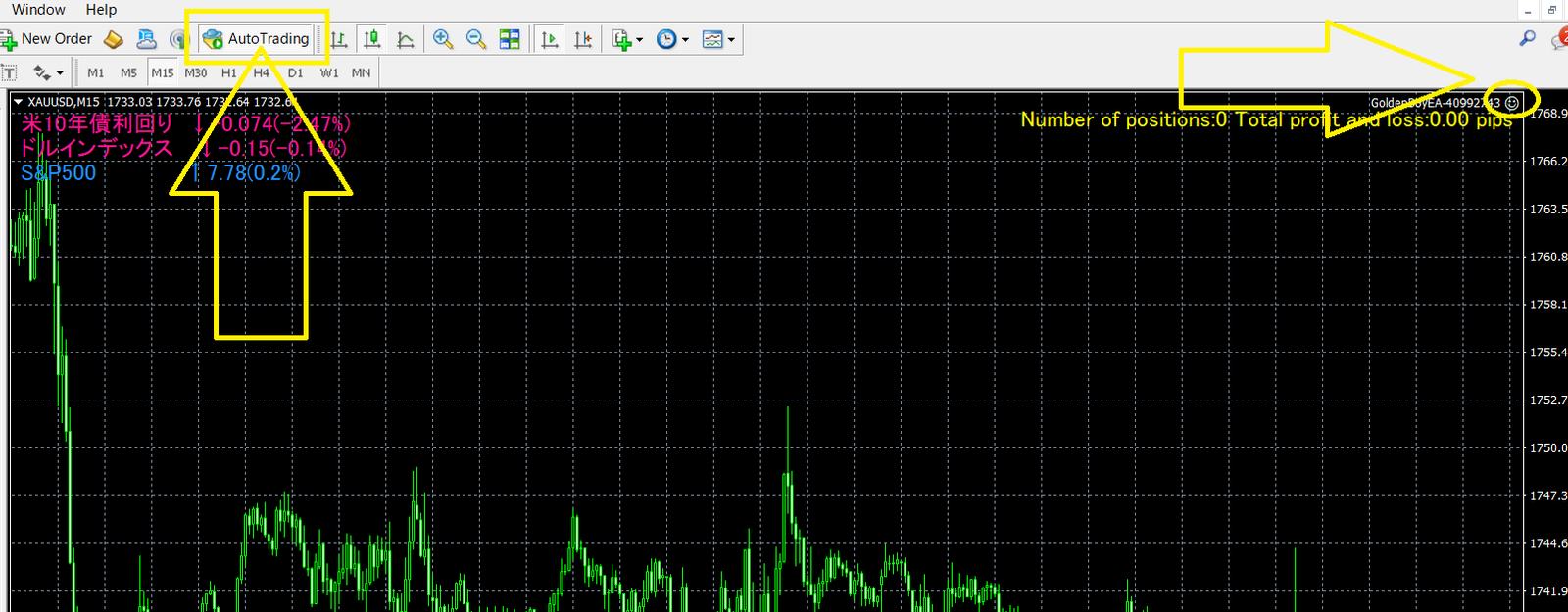
As long as MT4 remains running on your desktop cloud or VPS, the EA will continue to repeat automated buy and sell operations according to its logic.
Telegram Channel
GoldenBoy EA Telegram Channel
Use the channel for updates, guidance, and community information.
Final Summary
GoldMaster-EA is not designed to make you feel safe.
It is designed to give a portion of your capital a chance to expand dramatically.
Used correctly, it becomes a strategic portfolio unit: aggressive in growth, strict in withdrawals, disciplined in restart rules, and highly dependent on execution quality.
Keys to Using It Properly
- Follow the split structure
- Use strict withdrawal rules
- Pause after drawdowns
- Recalculate lot size after balance changes
- Do not interfere emotionally
GoldMaster-EA is not a passive shortcut. It is a strategy tool for traders who fully understand risk, structure, and execution.