
BreakoutLogic Navigator & Assist
Trade the first range breakout of the London–New York overlap. If it fails, the tool reverses with a larger lot and closes the whole set at a small combined target — with strict caps on steps, lots and loss.
What BreakoutLogic does
BreakoutLogic trades the first breakout of a quiet range during the London–New York overlap, when breakouts are most likely to follow through. If the breakout fails and price reverses, the tool opens a position in the other direction with a larger lot, so that one good move can close the whole set in profit. All positions close together at a small combined target.
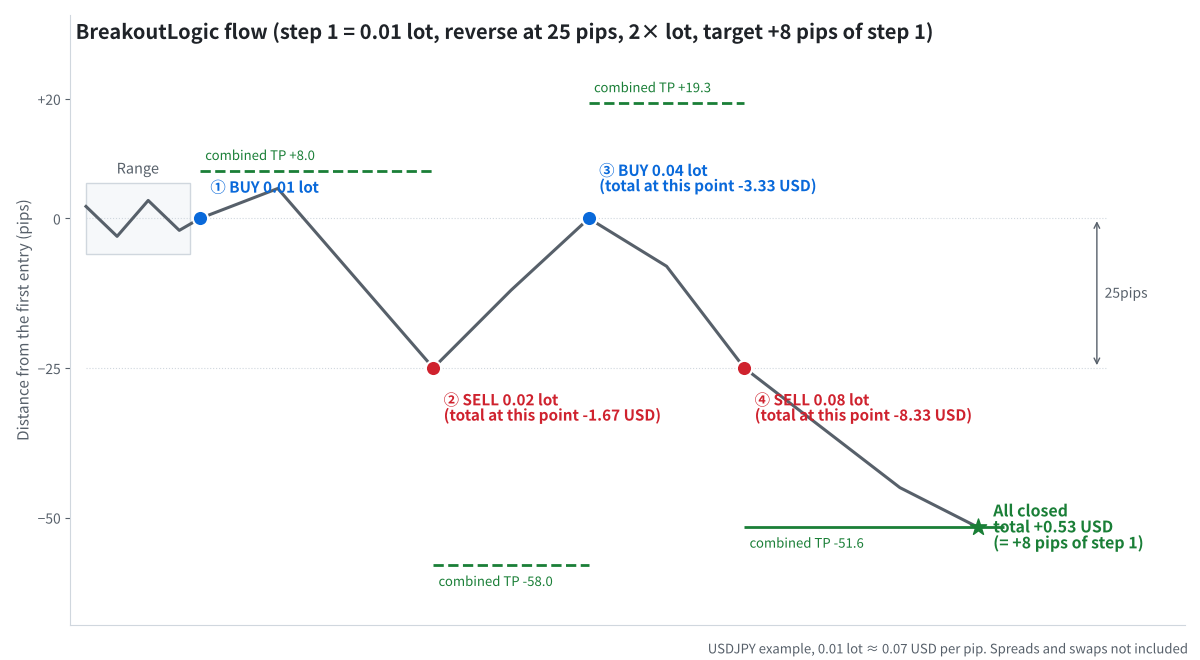
Example: step 1 = 0.01 lot, reverse at 25 pips with 2× lot, close all at +8 pips of step 1
The trading window
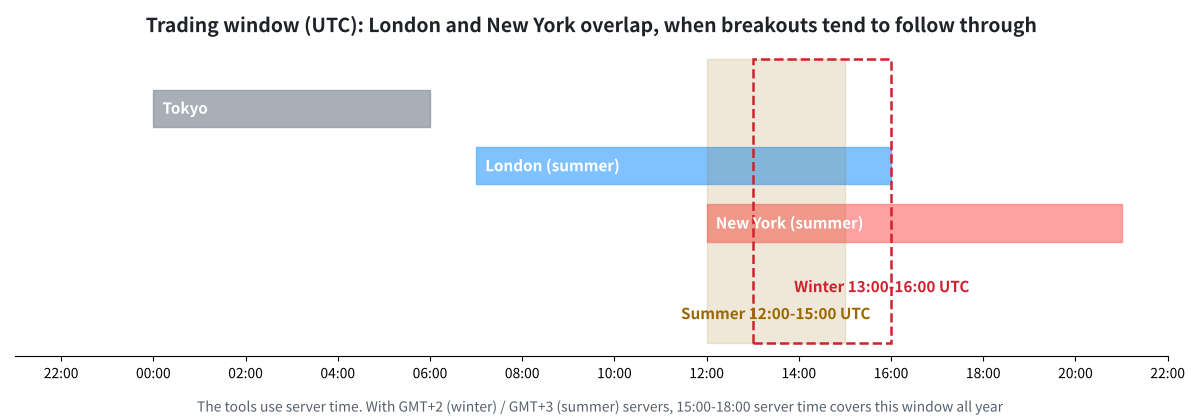
Only the first breakout inside the London–New York overlap is traded
By default the tools use 15:00–18:00 server time. On HFM and RoboForex servers (GMT+2 in winter, GMT+3 in summer) this matches the overlap all year. You can change the window in the settings.
Rules
- Range: the high and low of the last 20 bars. Ranges that are too wide (more than 5 × ATR) are ignored.
- Breakout: a bar closes more than 1 pip outside the range with a strong body (at least 1 × ATR) → step 1 in that direction.
- Reverse step: if price moves 25 pips against the last position, open the opposite direction with 2× the last lot. Maximum 4 steps.
- Combined target: when the total profit of all positions reaches 8 pips of the step-1 lot, everything closes.
- Loss limit: if the total loss reaches 10% of the balance, everything closes (or is fully hedged, if you choose).
Understand the risk before you start
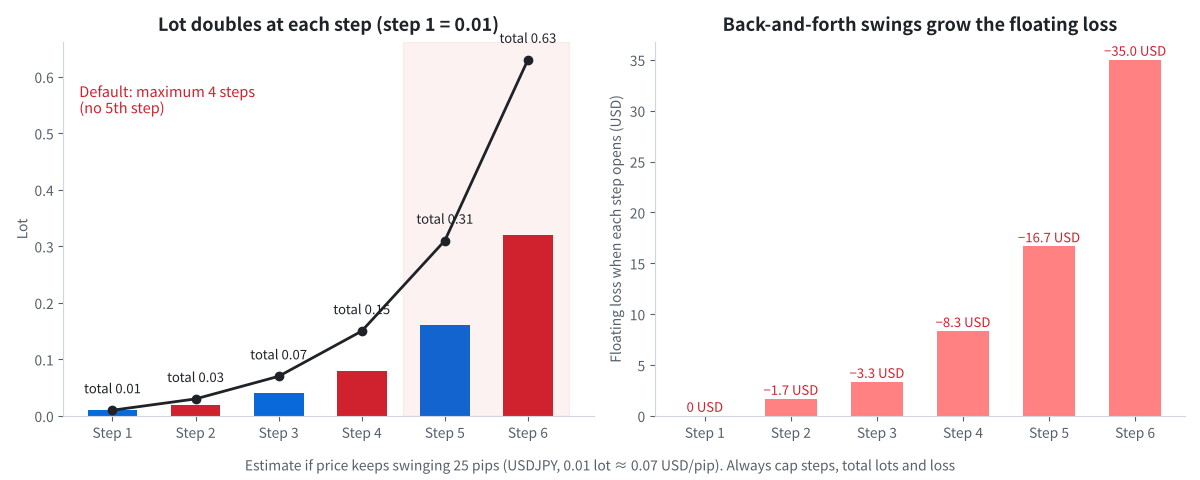
Lots double at each step, and repeated swings increase the floating loss
- With 0.01 lot at step 1, the 4th step is 0.08 lot and the total is 0.15 lot.
- Choppy markets that swing back and forth are the main danger.
- The safety limits — maximum steps, maximum total lots, minimum margin level 300% and the 10% loss limit — exist to stop this. Keep them on.
How to use the Navigator (indicator)
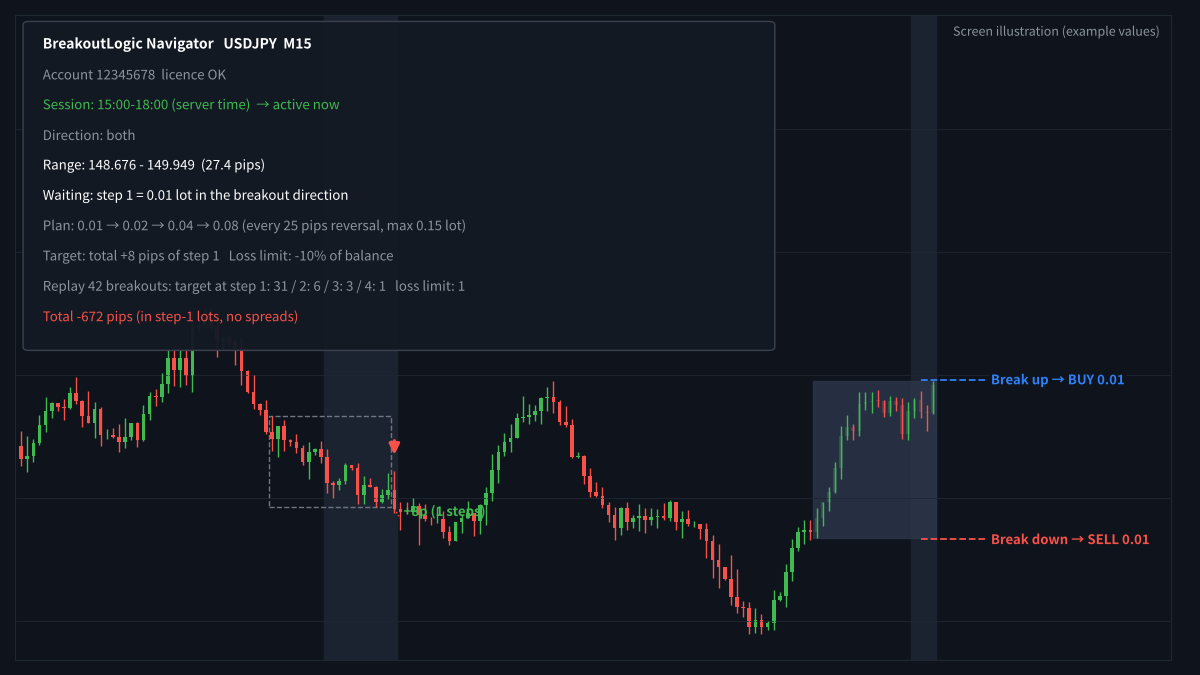
Session background, range box, breakout prices and the plan panel
- Attach BreakoutLogic Navigator to an M15 chart.
- The session is shaded, and the current range is drawn with its upper and lower breakout prices.
- The panel shows the full plan before you trade: step lots, the combined target and the loss limit.
- While a set is open, it shows the step number, buy/sell lots, total P/L, the combined take-profit price and the next step price.
- The history replay shows how past breakouts ended (which step reached the target, and how many hit the loss limit).
How to use the Assist EA (semi-automatic)
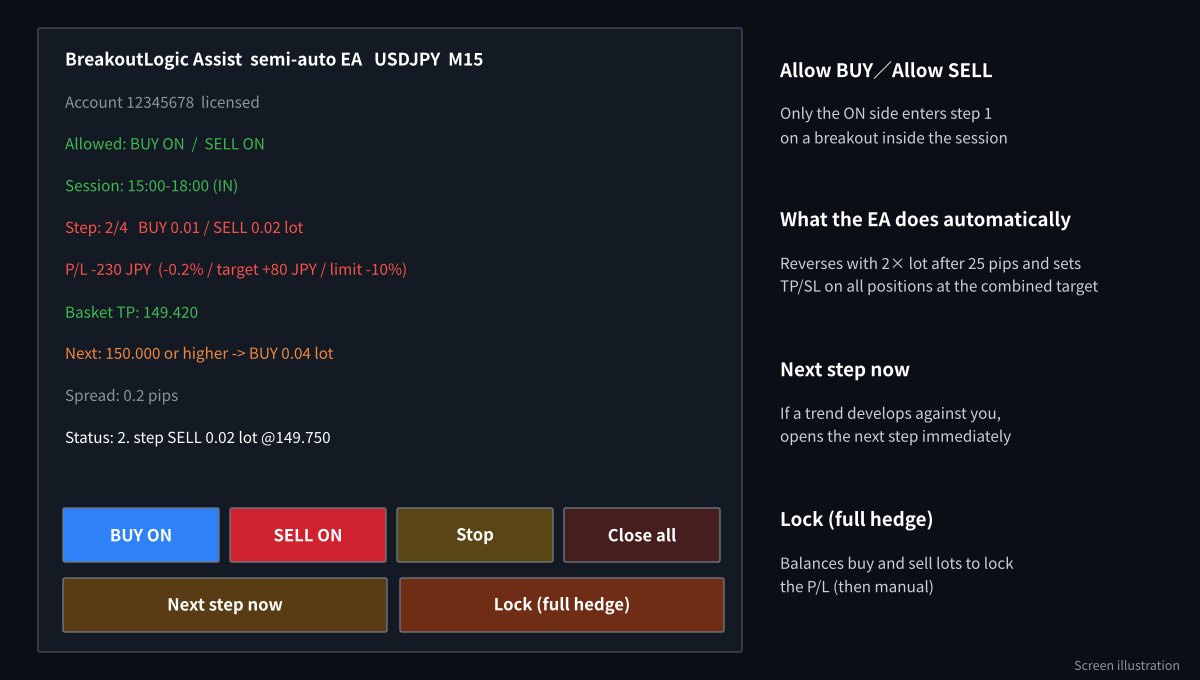
The Assist EA panel and buttons
- Attach BreakoutLogic Assist to the same chart and turn on AutoTrading.
- Click Allow BUY, Allow SELL or both. Step 1 opens only on a breakout inside the session.
- The EA opens the reverse steps automatically and places the combined take-profit/stop on every position, so the broker closes them even if the EA stops.
- Next step now opens the next step without waiting for 25 pips. Lock balances the buy and sell lots and hands control back to you.
Recommended settings
| Item | Default | Notes |
|---|---|---|
| Timeframe | M15 | |
| Step 1 lot | 0.01 | A cent account is recommended while you learn. |
| Reverse distance | 25 pips | Lot multiplier 2.0, maximum 4 steps. |
| Combined target | 8 pips of step 1 | |
| Loss limit | 10% of balance | Close all (default) or full hedge. |
| Guards | Max 1.0 lot total, margin level ≥ 300% | Spread limit 3 pips for step 1. |
| MT5 | Hedging account | The EA does not trade on netting accounts. |
Frequently asked questions
Is this a martingale?
It increases the lot after a failed breakout, so it shares the main risk of martingale systems. That is why the number of steps, the total lots and the total loss are capped by default.
What happens if my computer turns off?
Every position carries the combined take-profit and stop, so the broker can still close the set. New steps need MT4/MT5 to be running, so a Windows VPS is recommended.
Can I trade only one direction?
Yes. Allow only BUY or only SELL, and step 1 will only open in that direction.
Get BreakoutLogic free
Open an HFM or RoboForex account through our partner link, then send the request form. We build the files for your account number.
Compensation disclosure: Forex Top Team receives introducing-broker compensation from HFM and RoboForex based on the trading activity of referred clients. Client funds are held by the broker in the client’s own account; we never hold client funds. Nothing on this page is financial, investment, legal or tax advice.