
CurrencyPower Meter
See which of the 8 major currencies are strong and which are weak across 3 timeframes, find the best pair to trade, and know whether your chart favours a trend or a range method.
What the CurrencyPower Meter does
Every currency pair is two currencies pulling against each other. When a strong currency meets a weak one, the pair tends to trend. When two currencies have similar strength, the pair tends to move sideways. The CurrencyPower Meter measures all 8 major currencies at once, so you can see this before you choose a pair or a method.
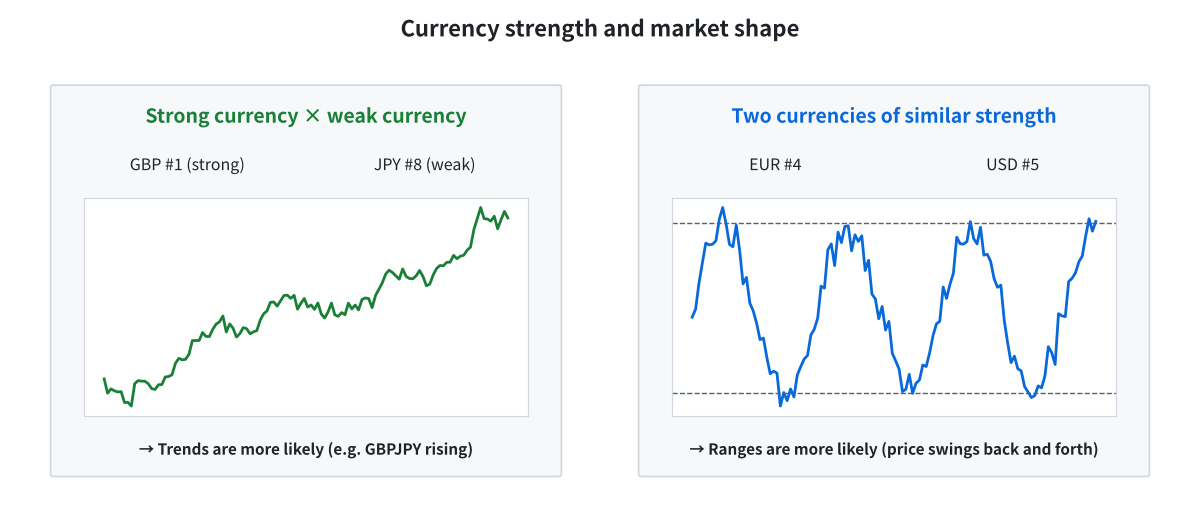
Strong × weak tends to trend; similar strength tends to range
What you see on the chart
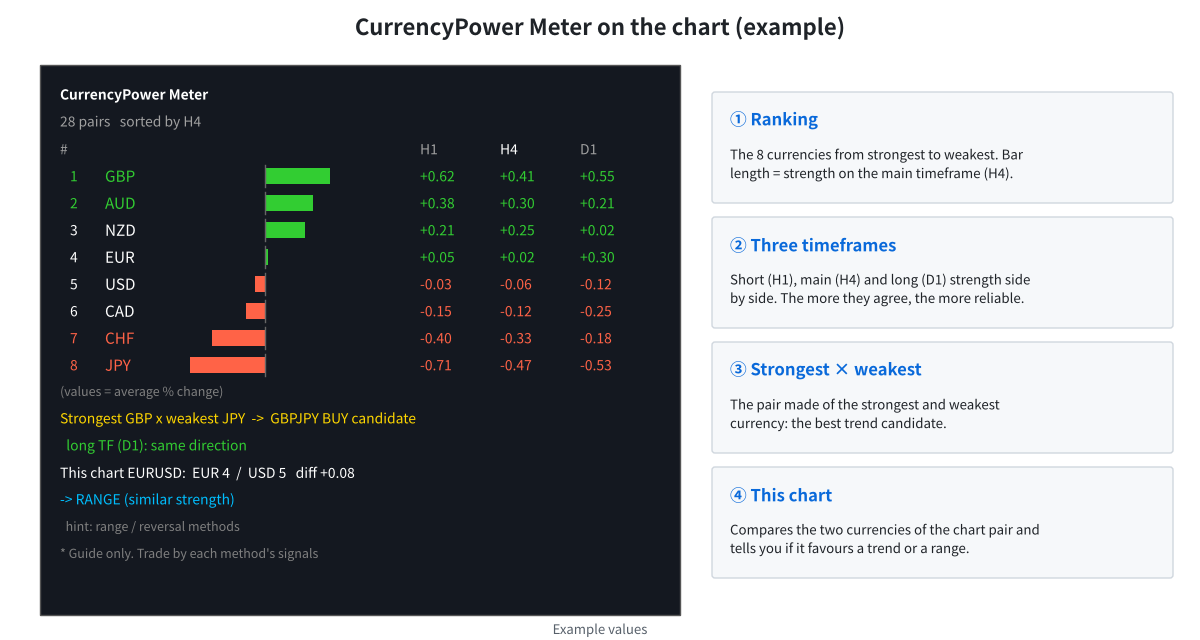
The meter panel: ranking, three timeframes, best pair and a verdict for your chart
- Ranking: EUR, GBP, AUD, NZD, USD, CAD, CHF and JPY from strongest to weakest.
- Three timeframes: H1 (last 24 bars), H4 (last 30 bars, used for the ranking) and D1 (last 20 bars, used to confirm direction).
- Best candidate: the pair made of the strongest and weakest currency, with its direction.
- This chart: a verdict for the pair on your chart — TREND (buy or sell), RANGE, neutral, or “be careful” when the long timeframe disagrees.
How the verdict works
| Condition for the chart pair | Verdict | Methods that fit |
|---|---|---|
| Rank gap 5 or more, and H4 and D1 point the same way | TREND (buy or sell) | TrendLogic, BreakoutLogic |
| Rank gap 5 or more, but D1 points the other way | Be careful | Wait for a clearer picture |
| Rank gap 2 or less | RANGE | SimpleRange, ReversalLogic |
| Anything in between | Neutral | No strong preference |
The strength of each currency is the average percentage change of its 7 pairs over each period.
How to use it
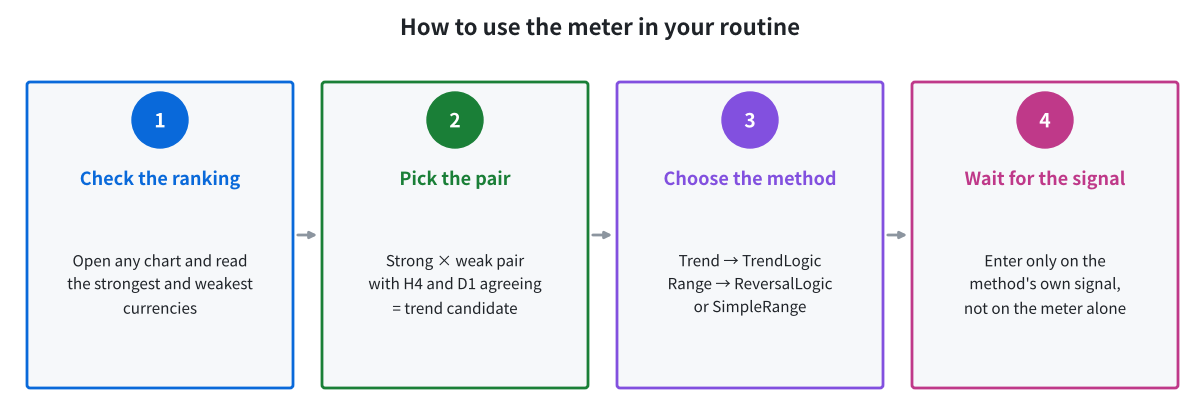
Use the meter to choose the pair and the method, then trade the method’s own signal
- Attach CurrencyPower Meter to any chart. It reads all 28 pairs in the background (the first load can take a moment).
- Look at the ranking and the best candidate pair.
- Open that pair, or check the verdict for the pair you already trade.
- Use the matching method and wait for its signal. The meter is a filter, not an entry signal.
- Optional: turn on alerts or push notifications to be told when the chart pair turns into TREND conditions.
Recommended settings
| Item | Default | Notes |
|---|---|---|
| Timeframes | H1 × 24, H4 × 30, D1 × 20 | Can be changed in the settings. |
| Trend threshold | Rank gap ≥ 5 | Higher = fewer, stronger trend calls. |
| Range threshold | Rank gap ≤ 2 | |
| Update interval | 5 seconds | Light on the terminal. |
| Symbol suffix | AUTO | Set it manually only if your broker uses a prefix. |
Frequently asked questions
Does the meter place trades?
No. It is an analysis indicator only. It never opens or closes positions.
Why does it say “Loading data”?
It needs price history for all 28 pairs. MT4/MT5 downloads them in the background; this usually takes a short time after the first start.
Which chart should I attach it to?
Any chart works. Attach it to the pair you trade to get the verdict for that pair as well.
Get the CurrencyPower Meter free
Open an HFM or RoboForex account through our partner link, then send the request form. We build the files for your account number.
Compensation disclosure: Forex Top Team receives introducing-broker compensation from HFM and RoboForex based on the trading activity of referred clients. Client funds are held by the broker in the client’s own account; we never hold client funds. Nothing on this page is financial, investment, legal or tax advice.